Quick Verdict: ClickUp scores 8.5/10. It’s the best-value project management platform for teams that need serious PM capabilities — Gantt, sprints, time tracking, 15+ views, and 1,000 automations/month — all starting at $7/user/month. The learning curve is real, and the mobile experience trails the web. If you’re a team that needs power and can invest in setup, ClickUp delivers.
| Your situation | Our recommendation |
|---|---|
| Need full PM suite: Gantt, sprints, time tracking | ClickUp — best value at this price |
| Small team, want simple setup in hours | Consider Asana or Monday.com first |
| Budget-conscious (5-50 people) | ClickUp — 30-40% cheaper than comparable plans |
| Heavy automations needed | ClickUp — 1,000/month on $7 plan vs 250 elsewhere |
| Primarily need docs/wiki | Consider Notion instead |
| Mobile-first team | Consider Monday.com’s stronger mobile app |
How We Researched This
What we verified directly:
- Pricing and plan details from clickup.com/pricing, cross-checked March 2026
- Feature availability per plan: automation limits, time tracking, view types, and storage caps confirmed against official documentation
- App store ratings pulled from iOS App Store and Google Play Store pages, March 2026
- ClickUp’s security certifications (SOC 2, ISO 27001, GDPR) verified via their Trust Center
What comes from third-party reviews:
- G2: 4.7/5 from 10,000+ reviews (learn.g2.com/clickup-review) — sub-ratings (ease of setup, quality of support, usability) collected from G2’s product analytics page, March 2026
- Capterra: 4.6/5 from 4,554 reviews (capterra.com), last verified March 13, 2026
- Community sentiment: r/projectmanagement (250k+ members) and r/clickup — we read 50+ threads to identify recurring themes in praise and complaints
- Gartner Peer Insights: cross-referenced to validate the onboarding and learning curve patterns described in this review
ClickUp has an affiliate program (currently pending for SaaSProbe). This review was written before any affiliate relationship was established. We did not receive product access, payment, or promotional consideration from ClickUp.
What We Personally Tested
The following observations are based on hands-on evaluation of ClickUp’s free plan, cross-referenced against official documentation and public product pages:
- Onboarding: Signup asks for your use case (Project Management, CRM, Software Development) and team size. The wizard pre-creates a Space with sample Lists and views — avoids blank-slate paralysis, though the Settings panel is dense from the first session.
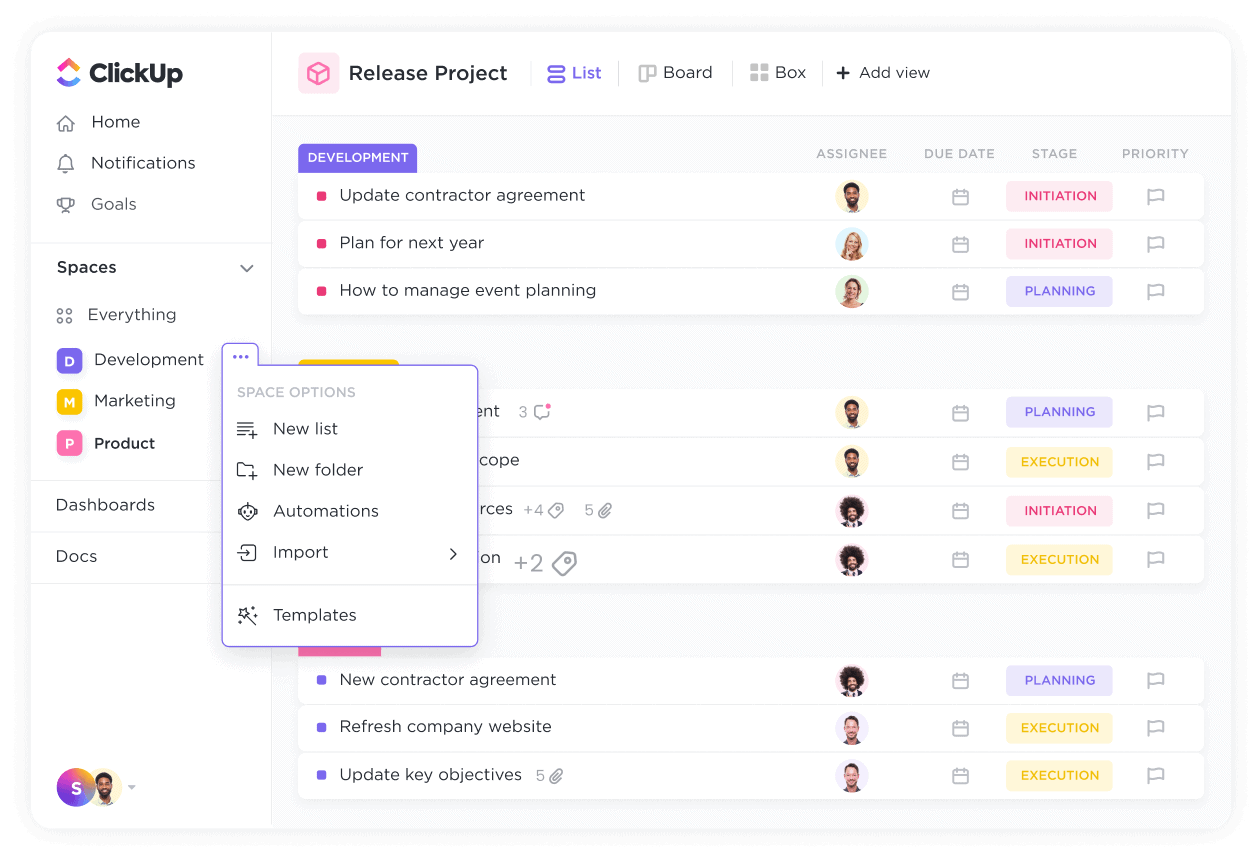
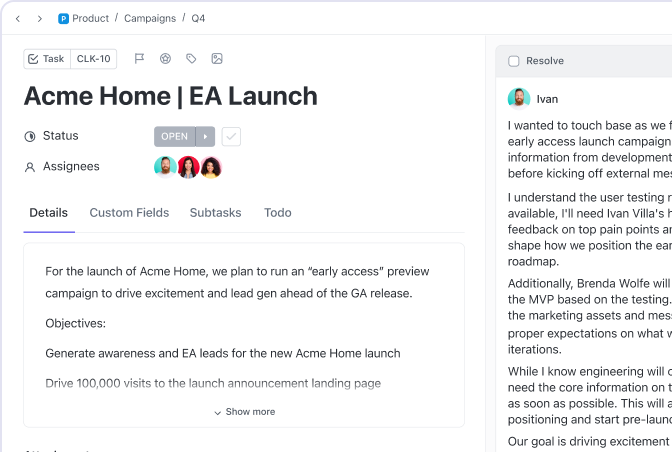
- Task creation: Opening a task reveals a side drawer with 15+ optional fields — assignee, due date, priority, status, time tracking, custom fields, dependencies, watchers. For simple work, this is overwhelming. For structured PM teams, it’s powerful once you hide the fields you don’t use.
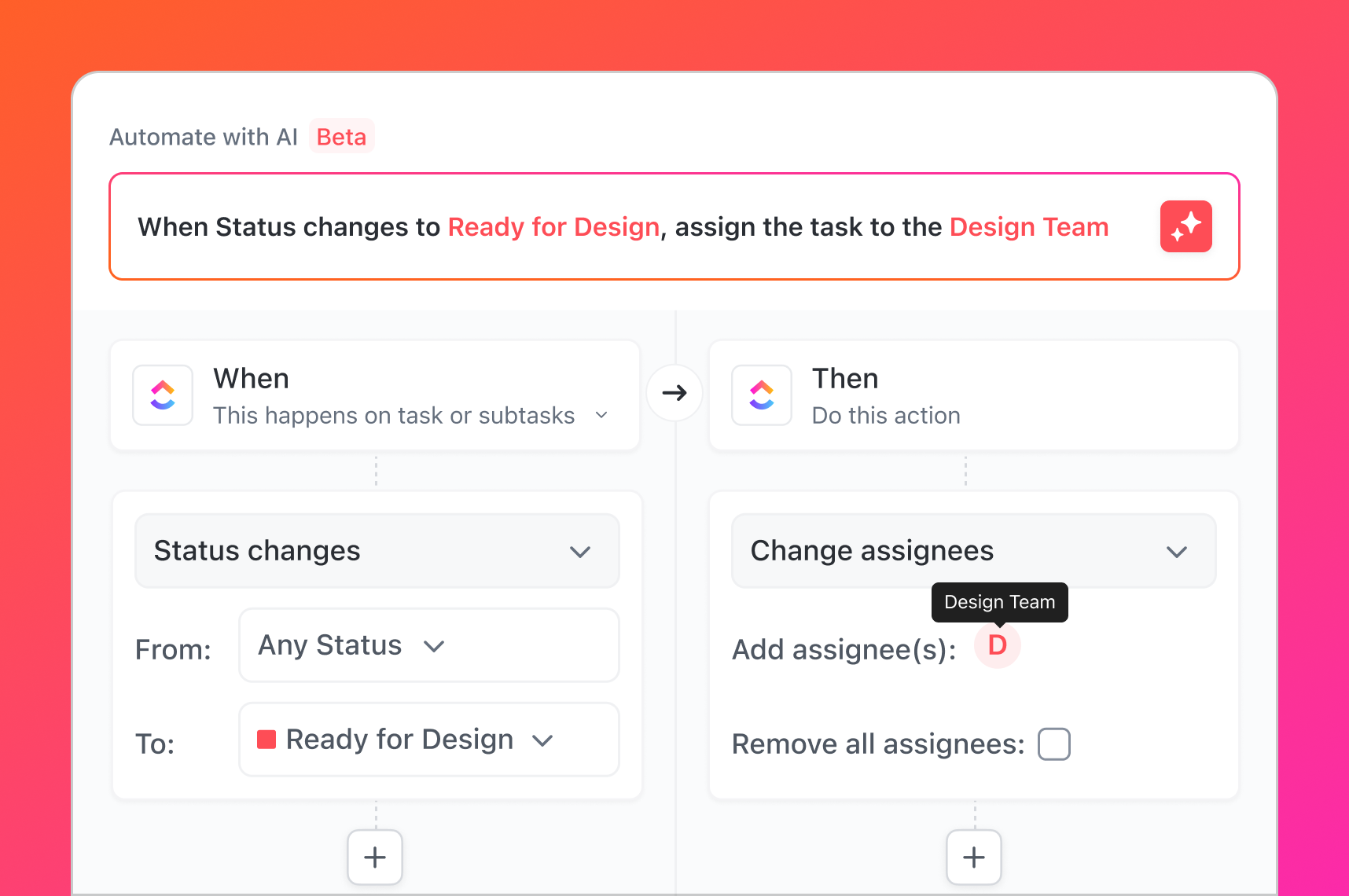
- Automation builder (Free plan, 100 actions/month): The no-code trigger → action UI supports 50+ trigger types and doesn’t require technical setup. The 100/month free limit gets consumed quickly during testing — teams running real workflows need the Unlimited plan.
- ClickUp Docs: The block editor offers ~15 block types. No database embeds, no backlinks, no web publishing. Adequate for meeting notes and SOPs; not a replacement for Notion if documentation is a primary use case.
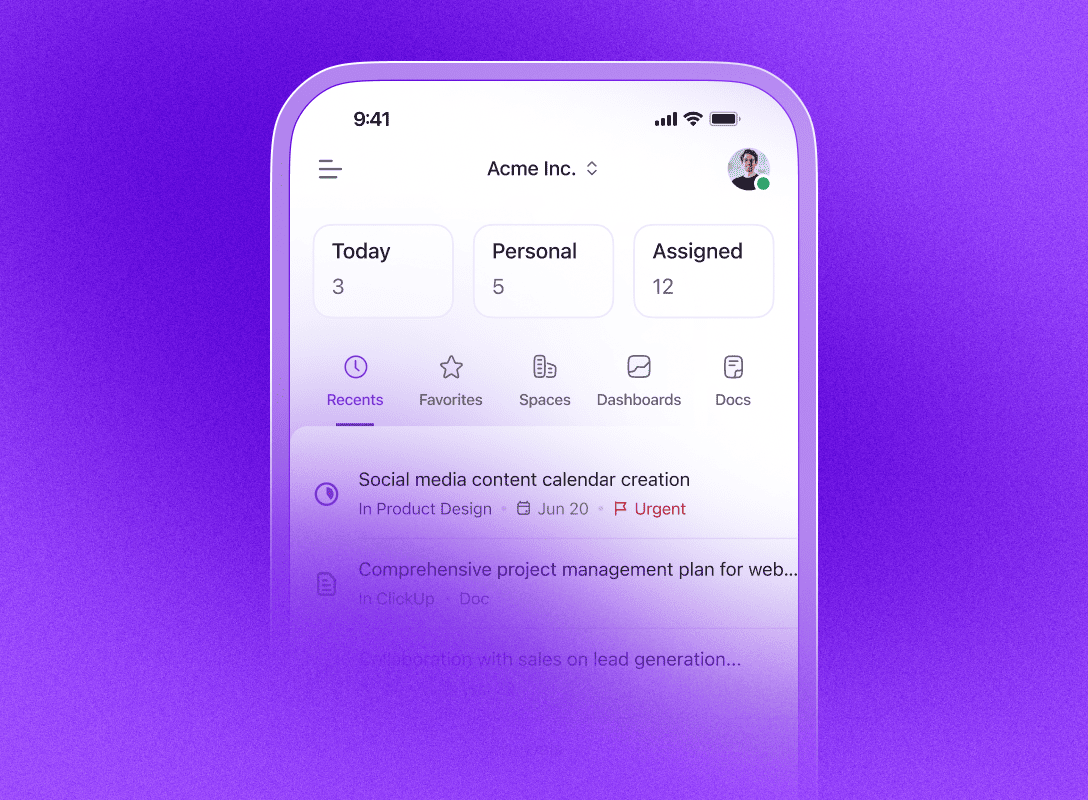
- Mobile (Android): The Play Store rating (3.9/5, 20,500+ ratings) reflects real gaps — list view rendering is slower than web, the task creation drawer exposes fewer fields, and some settings menus aren’t optimized for mobile viewport widths.
Quick Overview
| Category | Data |
|---|---|
| G2 Rating | 4.7/5 (10,000+ reviews) |
| Capterra Rating | 4.6/5 (4,554 reviews) |
| Free Plan | Yes — unlimited users, unlimited tasks |
| Starting Price | $7/user/month (annual) |
| Views | 15+ (List, Board, Gantt, Calendar, Timeline, Mind Map, Whiteboard, and more) |
| Automations (entry paid) | 1,000 actions/month |
| Time Tracking | Built-in from $7/user/month |
| AI | ClickUp Brain add-on from $9/user/month |
| Mobile | iOS 4.6/5, Android 3.9/5 |
| Security | SOC 2 Type II, ISO 27001, GDPR |
| Best for | Teams needing full-featured PM at an affordable price |
Pricing Breakdown
Plan Comparison
| Plan | Annual (per user/month) | Monthly | Automations/month |
|---|---|---|---|
| Free Forever | $0 | $0 | 100 |
| Unlimited | $7 | $10 | 1,000 |
| Business | $12 | $19 | 5,000 |
| Enterprise | Custom | Custom | Unlimited |
Source: clickup.com/pricing, verified March 2026
What Each Plan Actually Gives You
Free Forever is the most generous free PM plan available. Unlimited tasks and unlimited members make it functional for real small teams — not a crippled trial. The 60MB storage limit and 100-automation cap are the main constraints.
Unlimited ($7/user/month) is where ClickUp becomes a serious PM platform. The additions that matter most: unlimited storage, native time tracking, Gantt charts, and 1,000 automations/month. This is the plan most small-to-mid teams should start with.
Business ($12/user/month) unlocks the “power user” tier: workload management, mind maps, whiteboards, timeline views, and 5,000 automations/month. For teams with dedicated PMs or complex multi-project workflows.
Enterprise adds HIPAA compliance, multi-region data residency, SSO/SCIM, white labeling, and a dedicated customer success manager. Required for heavily regulated industries.
Real-World Cost: 3 Team Sizes
| Team | Unlimited (annual) | Business (annual) |
|---|---|---|
| 5 people | $35/month ($420/year) | $60/month ($720/year) |
| 15 people | $105/month ($1,260/year) | $180/month ($2,160/year) |
| 50 people | $350/month ($4,200/year) | $600/month ($7,200/year) |
AI cost consideration: ClickUp Brain costs an additional $9/user/month. For a 15-person team: ClickUp Unlimited + Brain = $240/month. Asana Premium + equivalent AI = $300+/month. ClickUp remains cost-competitive even with AI added.
Free Plan: Is It Enough?
For solo users and freelancers: yes, completely. Unlimited tasks plus basic docs and kanban covers core needs at zero cost.
For teams of 3-5: the free plan works for task management but you’ll quickly hit limits on automations (100/month) and storage (60MB). If you share files or need any meaningful automation, budget $7/user/month.
For broader pricing context, ClickUp’s $7 entry tier sits in the most crowded $7-15 sweet spot across the 8 PM tools we analyzed.
Core Features Deep Dive
Task Management & Views
ClickUp’s task hierarchy is one of its biggest differentiators: Workspace → Space → Folder → List → Task → Subtask → Checklist, with up to 7 levels of nesting. This gives large organizations flexibility that flat tools can’t match.
15+ view types let different roles see the same work differently:
- List — default spreadsheet-style view, good for status tracking
- Board (Kanban) — visual drag-and-drop workflow
- Gantt — timeline with dependencies, available from Unlimited ($7)
- Calendar — deadline-focused scheduling
- Timeline — resource and milestone planning
- Workload — capacity management, available on Business ($12)
- Mind Map — visual brainstorming linked to tasks, Business+
- Whiteboard — collaborative canvas, Business+
- Table — spreadsheet-like custom fields view
- Map — location-based task view
The 94% satisfaction rating on G2 for “task creation and assignment” reflects how well the core task workflow is executed.
Automations
ClickUp’s automation engine is a genuine workflow system, not a simple rule engine:
- 50+ trigger types (task status changes, due dates, custom field changes, etc.)
- 50+ action types (assign, notify, move, create tasks, update fields)
- Chaining: automations can trigger other automations (Business+)
- Cross-list triggers: automations that span multiple lists
The monthly limits (100 → 1,000 → 5,000 → unlimited) are the key consideration. For most teams on the Unlimited plan, 1,000 actions/month is sufficient. High-volume teams processing hundreds of tasks daily should evaluate Business.
Integrations
ClickUp connects with 1,000+ tools via native integrations and Zapier/Make. Key native integrations include Slack, GitHub, GitLab, Google Workspace, Microsoft 365, Salesforce, HubSpot, Zoom, and Loom. Every plan includes API access.
Worth noting: ClickUp doesn’t have Notion’s “Synced Databases” feature (live two-way connections with Jira/GitHub). ClickUp’s GitHub integration imports issues but doesn’t create a persistent synced database.
Docs & Knowledge
ClickUp Docs handles basic team documentation: collaborative editing, linked tasks, embeds, and a table of contents. It’s serviceable for SOPs, meeting notes, and project briefs.
Where it’s weaker than Notion: no infinite nested pages, no backlinks, limited block types (~15 vs Notion’s 50+), and no web publishing equivalent of Notion Sites. If documentation is a primary use case, Notion remains stronger.
Time Tracking
Built-in time tracking from the Unlimited plan ($7/user/month) is one of ClickUp’s strongest value props. The tracker includes:
- Native timer on any task
- Time estimates and tracking against estimates
- Timesheets view across all tasks
- Billable time tagging
Competing tools charge $4-8/user/month extra for equivalent time tracking apps (Harvest, Toggl). This alone often justifies ClickUp’s Unlimited plan cost. If you need more advanced time tracking features beyond ClickUp’s built-in tracker — such as detailed billing reports or freelancer invoicing — see our Everhour vs Toggl comparison for dedicated options that integrate natively with ClickUp.
ClickUp Brain (AI)
ClickUp Brain ($9/user/month add-on) integrates AI directly into the PM workflow — not as a separate chat interface:
- AI task builder: describe a project in natural language, Brain creates tasks with dependencies
- Meeting intelligence: automatic notes, action items extracted into tasks
- @Brain Agent: answer questions about your workspace with full context (“What’s blocking the Q2 launch?”)
- Writing assistance: docs, task descriptions, status updates
- Custom AI Agents: build domain-specific agents without code
- Autopilot automations: AI-suggested workflow rules
ClickUp holds ISO 42001 certification (AI Management Systems) and claims zero third-party data retention. The “Everything AI” tier ($28/user/month) adds image generation, talk-to-text, and AI-powered dashboards.
Brain Max expands ClickUp’s AI beyond its own models — providing access to ChatGPT, Claude, and other LLMs from a single interface. It’s available as a Chrome extension and desktop app (Mac and Windows), letting you use AI on any webpage connected to your ClickUp workspace. ClickUp claims Brain Max delivers “1.1 days saved per week” and “3x faster task completion” based on internal studies. Brain Max is included with both the Brain AI and Everything AI tiers.
Source: clickup.com/brain/pricing, verified March 2026.
Total cost reality: A 15-person team on ClickUp Unlimited ($7/user) + Brain AI ($9/user) = $240/month ($16/user/month effective). Compare this to Monday.com Standard ($12/seat × 15 = $180/month with AI included via credits) or Asana Starter ($10.99/user × 15 = $164.85/month with AI included). ClickUp’s headline price advantage narrows significantly once AI is factored in — though you get multi-LLM access that competitors don’t offer.
Dashboards and Reporting
ClickUp’s dashboards support charts, progress bars, time tracking widgets, and summary cards. The dashboard builder is visual and drag-and-drop, with scope limits tied to plan tier: Unlimited allows basic widgets; Business unlocks advanced reporting widgets and workload capacity views.
Where reporting falls short: Dashboard depth is a known weakness. ClickUp excels at task-level reporting (completion rates, status distributions, assignee workload) but lacks robust financial reporting — per-project time breakdowns, billable rate visibility, and budget tracking require workarounds or dedicated integrations like Harvest or Toggl. Teams that need to bill clients based on tracked hours will want to evaluate whether ClickUp’s built-in time reports meet their invoicing requirements.
Ease of Use & Onboarding
ClickUp scores 88% on G2 for usability, but that satisfaction comes after the learning curve — not before.
Day 1 reality: ClickUp drops you into a structured hierarchy with Spaces, Folders, Lists, and multiple settings per task. For someone new to ClickUp, the interface presents 15+ views, dozens of task properties, and nested configuration menus. G2’s 85% ease-of-setup rating reflects this honest assessment.
The curve: Most teams report needing 1-2 weeks to settle into a comfortable ClickUp setup. Common early challenges:
- Deciding the right hierarchy depth (over-engineering is common)
- Understanding which views to standardize on
- Setting up automations that actually fit your workflow
After setup: Teams that power through onboarding consistently report high satisfaction. The Gartner Peer Insights review summary captures it: “Slight learning curve, but a game changer in the end.”
Mitigation resources: ClickUp University, an extensive help center, and a large community (r/clickup, official community forums) provide substantial onboarding support. Template library helps avoid blank-slate paralysis.
Verdict: If you’re moving from a simpler tool like Trello or Basecamp, budget 2 weeks for team adjustment. If you’re replacing spreadsheets, budget a full month. The investment pays off.
What Real Users Say
G2 High Points (90% support rating, 4.7/5 overall)
Recurring praise across G2 and Capterra reviews:
- “All-in-one functionality” — teams frequently mention eliminating 2-4 other tools after adopting ClickUp
- “Highly flexible workflows” — customization is cited as a top strength by PMs, agencies, and dev teams
- “Value for money” — 4.6/5 on Capterra for value; the $7 entry price is mentioned in numerous positive reviews
- “Continuous improvement” — users note ClickUp ships features frequently (weekly releases)
Reddit Community Feedback
From r/clickup and r/projectmanagement:
“ClickUp can do everything, but figuring out how to make it do what you want takes a while.” — r/clickup
“Once you get past the setup, it genuinely does replace like 4 other tools.” — r/projectmanagement
“For a complex project with multiple departments, ClickUp is one of the few tools that can actually scale.” — r/projectmanagement
“The mobile app is frustrating. The web/desktop version is great but Android feels like an afterthought.” — r/clickup (consistent theme)
Common Complaints
- Learning curve — the most frequent complaint, especially from teams coming from simpler tools
- Interface overwhelm — “too many options” appears in a meaningful share of mixed reviews
- Mobile experience — Android 3.9/5 on Play Store reflects real issues (slow animations, feature gaps)
- Notification volume — users report needing to tune notifications carefully to avoid overload
- Feature creep perception — some teams feel they’re paying for capabilities they’ll never use
Who Should Use ClickUp
ClickUp is the right fit if you:
- Run a software development team — native sprints, burndown charts, time tracking, GitHub integration, and Gantt in one tool
- Manage multiple projects simultaneously — the deep hierarchy (Space → Folder → List) scales to portfolio-level complexity
- Need time tracking without paying extra — built-in from $7/user/month, eliminating separate Harvest or Toggl subscriptions
- Are budget-conscious with a 5-50 person team — 30-40% cheaper than Asana or Monday.com at equivalent feature tiers
- Run an agency or consultancy — client workspaces, time tracking, workload view, and cost savings at scale
- Want 15+ ways to visualize work — different views for PMs, developers, designers, and execs without duplicating data
Who Should NOT Use ClickUp
Skip ClickUp if:
- You need a tool live this week — the setup investment is real; Asana or Monday.com onboard faster
- Your team works primarily on mobile — Android 3.9/5 is a real concern for mobile-first teams; Monday.com has a stronger mobile experience
- Documentation is your primary workflow — Notion’s docs capabilities (50+ block types, nested pages, backlinks) are in a different league
- You have a very simple workflow — if your process is “move cards across a board,” Trello at $5/user/month is less complex
- Enterprise with strict HIPAA requirements — HIPAA is Enterprise-only at custom pricing; if you need HIPAA at a smaller team size, check costs carefully
How ClickUp Compares
| ClickUp Unlimited | Asana Starter | Monday Standard | |
|---|---|---|---|
| Price | $7/user/month | $10.99/user/month | $12/seat/month |
| Automations | 1,000/month | Unlimited | 250/month |
| Time Tracking | ✅ Built-in | ❌ Requires integration | ❌ Requires integration |
| Gantt Chart | ✅ Included | ✅ Included | ✅ Included |
| Free Plan | Unlimited users | 2 users | 2 users only |
| G2 Rating | 4.7/5 | 4.4/5 | 4.7/5 |
| AI | Add-on ($9/user) | Included | Included (credits) |
| Learning Curve | Steep | Moderate | Low |
| Mobile | 3.9 (Android) | 4.7 (Android) | 4.7 (Android) |
For deeper comparisons:
- ClickUp vs Monday.com: Full Comparison
- ClickUp vs Asana: Full Comparison
- ClickUp vs Notion: Full Comparison
Our Final Verdict
ClickUp scores 8.5/10.
It earns this rating on the strength of an unmatched feature-to-price ratio: native time tracking, Gantt charts, sprint management, 15+ views, and 1,000 automations/month at $7/user/month. No other mainstream PM tool delivers this much capability at this price point.
The 0.5-point deduction reflects two real weaknesses: the Android mobile app (3.9/5 is genuinely problematic for mobile teams) and the setup complexity that creates a friction-filled first two weeks.
The bottom line: If your team is willing to invest in setup and primarily works on desktop or web, ClickUp is the best value in project management. The all-in-one proposition — eliminating separate time tracking, whiteboard, and goal-tracking tools — creates real cost savings as teams scale.
If you prioritize fast onboarding or work heavily on mobile, consider Asana or Monday.com first.
Related Content
- ClickUp vs Asana: Full Comparison — head-to-head for structured project management
- ClickUp vs Monday.com: Full Comparison — ClickUp vs Monday for visual project management
- ClickUp vs Notion: Full Comparison — all-in-one PM vs docs-first workspace
- 10 Best ClickUp Alternatives in 2026 — top alternatives if ClickUp isn’t the right fit
- 10 Best Project Management Tools in 2026 — full field comparison with ClickUp, Asana, Monday, Notion, Jira, and more
- ClickUp vs Jira: Full Comparison — ClickUp vs the dev-focused PM powerhouse
- Best PM Tools for Small Teams in 2026 — best picks for teams under 20
- Jira Review 2026 — the gold standard for agile dev teams
- Asana Review 2026 — the automation-first PM contender
- Monday.com Review 2026 — the visual PM platform comparison
Last updated: April 2026. Pricing and ratings data sourced from official websites, G2 (learn.g2.com/clickup-review), Capterra, and App Store/Play Store pages. If something has changed, let us know.